C'est une application universelle pouvant fonctionner à la fois sur iPhone et iPad.
L'originalité de l'application est son interface graphique qui permet à l'utilisateur de visualiser la profondeur de champ sur toutes les valeurs de diaphragmes sans avoir à modifier un paramètre.
L'utilisateur peut alors se rendre compte rapidement de l'influence de son réglage, et des autres possibilités qu'il a pour gérer la zone de netteté.
---------------------------------------------------------------------------------------------------------------
DoF Viewer is an application used to calculate the depth of field (DoF) as well as the Angle of View (AoV).
It also calculates the hyperfocal distance, the near and far boundaries for acceptable sharpness (near focus and far focus).
The application is Universal, it means it can run on both iPhone and iPad.
The originality of the application is its graphical interface that allows the user to view the depth of field values on all the aperture range without having to change a new setting.
The user can quickly realize the influence of its setting, and other possibilities it has to manage the depth of field.
---------------------------------------------------------------------------------------------------------------

Grâce a une fenêtre "glissante", DoF Viewer donne la valeur de l'hyperfocale, la profondeur de champ (DOF), la distance minimum et maximum de netteté (Near Focus, Far Focus) pour chaque valeur de diaphragme et cela sans toucher à aucun bouton!
Simplement avec un "swipe" verticale sur la zone graphique.
Nouveautés pour la version 2.12
* Mise à jour de la base de données incluant les derniers appareils disponible
* Choix entre une interface foncée ou claire
----------------------------------------------------------

The depth of field is calculated in "real time".
Thanks to a "moving" window, DoF Viewer gives the value of the hyperfocal, the depth of field (DOF), the minimum and maximum distance of acceptable sharpness zone (Near Focus Far Focus) for each f-stop. And this without any button!
Simply with a "vertical" swipe on the workspace.
New features in version 2.12
* Camera database updated with latest models
* Choice between a dark or clear interface
---------------------------------------------------------------------------------------------------------------
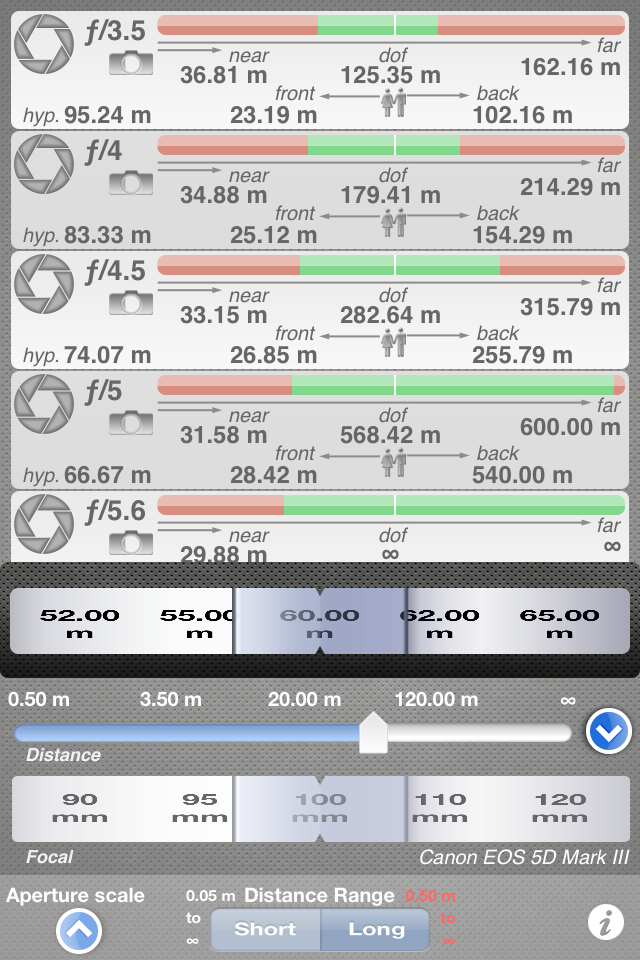
La version 2.12 améliore l'interface utilisateur
Il n'était pas toujours facile de sélectionner la distance avec le "slider" de l'iPhone.
La nouvelle version ajoute un "picker" pour sélectionner plus rapidement la bonne distance.
De plus l'échelle de distance n'est plus liée au type de focale permettant ainsi un plus grand choix.
----------------------------------------------------------
The 2.12 version improves the user interface
It was not always easy to select the distance with the iPhone "slider".
The new version adds a "picker" to quickly select the correct distance.
Also the distance scale is no longer related to the type of lens allowing a wider choice.
---------------------------------------------------------------------------------------------------------------

Un "swipe" horizontal permet d'accéder au calcul de l'angle de vue et de l'angle de champ.
L'angle de vue (Angle of View) est donné en degrés il représente l’angle couvert par l'objectif (horizontal, vertical et diagonal)
L'angle de champ (Field of View) est donné en mètres il correspondant à la distance couverte par l'objectif pour une distance donnée.
----------------------------------------------------------
A "horizontal" swipe provides access to the calculation of the angle of view The angle of View is given in degrees it represents the angle covered by the lens (horizontal, vertical and diagonal) The field of view is given in meters (feet) it represents the distance covered by the lens for a given distance.
---------------------------------------------------------------------------------------------------------------

Un mode "Expert" est disponible pour calculer le cercle de confusion
Ce calcul permet de s'affranchir du critère de Zeiss et permet d'estimer la profondeur de champ par rapport à l'agrandissement de l'image finale.
Pour plus d'information, vous pouvez consulter le fichier d'aide
----------------------------------------------------------
An "Expert" mode is available to calculate the circle of confusion
This calculation eliminates the criterion of Zeiss and can estimate the depth of field with respect to the final image (enlargment).
For more information, you can download the help file
---------------------------------------------------------------------------------------------------------------

La version iPad permet de comparer en même temps deux types de configuration différentes
L'utilisateur peut donc rapidement estimer le rendu de la profondeur de champ sur le tirage final et se rendre compte de l'impact de la distance d'observation sur la perception de la profondeur de champ.
--------------------------------------------------
With The iPad version it is possible to compare two different types of configuration
The user can estimate the rendering of depth of field on the final print and realize the impact of viewing distance on perceived depth of field.
---------------------------------------------------------------------------------------------------------------

Cette vue en forme de "barre graphe" visualise la profondeur de champ pour toute la gamme d'ouverture La partie supérieur du graphe (barre verte) represente la distribution de la profondeur de champ pour la gamme d'ouverture choisie.
Une barre verte supérieure à 100% indique que la profondeur de champ est supérieure à 100 mètres (infinie) On identifie rapidement l'augmentation ou diminution de la PdC en fonction de l'ouverture grâce aux repères 100% et 50%.
50% representant une PdC divisée par 2 par rapport à la PdC maximum affichée. La partie inférieure (barre rouge) represente la zone de netteté situé devant la distance de mise au point. On identifie également rapidement l'augmentation ou diminution de cette zone en fonction de l'ouverture grâce aux repères 100% et 50%.
---------------------------------------------------------------------------------------------------------------

Another view is used to display the depth of field in another way !
This "bar graph" view shows the depth of field for the entire range of f-stop The upper graph (green bar) represents the distribution of the depth of field for the aperture range selected.
A green bar above 100% indicates that the depth of field is greater than 100 meters (328 ft) (infinite) The user can quickly identify the increase/decrease of the Depth of Field according to the f-stop thanks to 100% and 50% indicators.
50% representing a depth of field divided by 2 with respect to the maximum displayed DoF. The bottom (red bar) represents the acceptable sharpness zone in front of the focusing point. The user can also quickly identify the increase/decrease of this zone according to the f-stop thanks to 100% and 50% indicators.
---------------------------------------------------------------------------------------------------------------